
XOAP Package Wizard
Standardized. Versioned. Deployment-ready. Build PSADT v4 packages without writing code – and deploy to SCCM, MECM, Intune or any PowerShell-capable tool.
Hit play for a walkthrough
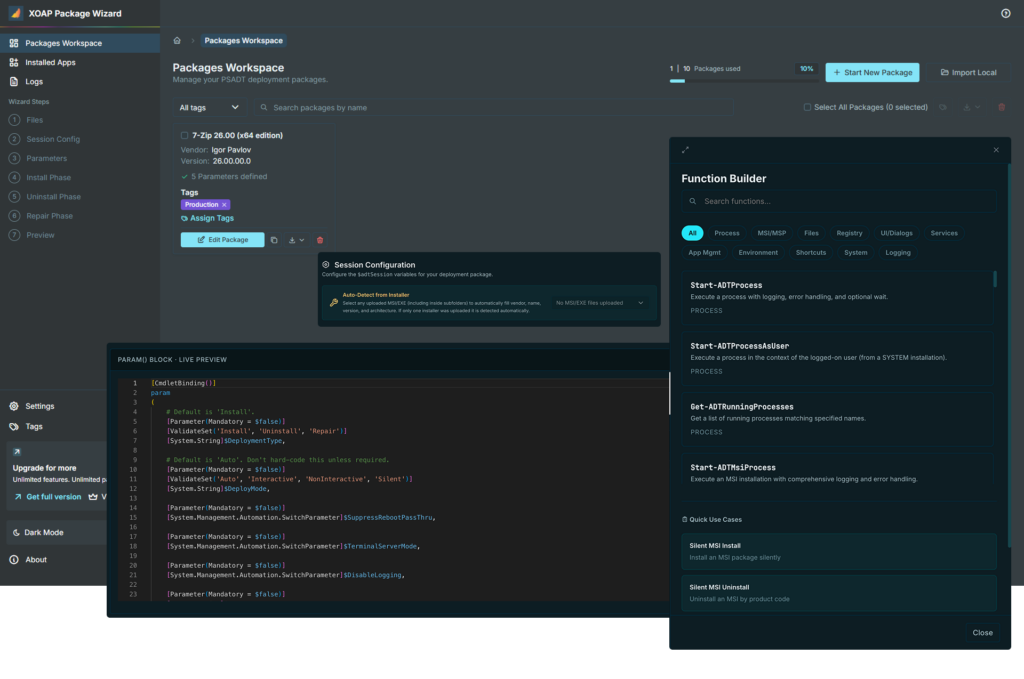
Build deployment-ready PSADT v4 packages through a guided 7-step wizard, without writing a single line of PowerShell.
- Every wizard step from files to repair
- Cmdlet autocomplete, function builder and live test run
- Export, uninstall generation and v3-to-v4 conversion
Guided structure, no coding, consistent results
Create deployment-ready packages in minutes
Build standardized, versioned software packages without writing code. A guided 7-step wizard walks you through files, session configuration, parameters and install, uninstall and repair logic — then exports a ready-to-deploy package automatically.
Automate software packaging & delivery →Start packages from an installer
Upload your installer files, let the wizard detect application details and generate a package structure. Use the built-in Function Builder and cmdlet autocomplete to define install, uninstall and repair steps.
Blog: Evergreen packages explained →Structure package logic with precision
Go beyond basic scripting. Use the Function Builder's full cmdlet library — covering processes, MSI/MSP operations, files, registry and more — to build repeatable deployment logic in one place.
Why XOAP for smarter IT operations →Deploy to any target, including Microsoft Intune
Export packages as standard PSADT v4 ZIP files for SCCM, MECM or any PowerShell-capable deployment tool. Batch-export multiple packages at once from the dashboard or export individually per package.
Explore XOAP Package Wizard for free →XOAP Package Wizard
Stop writing deployment scripts by hand. Build standardized, versioned PSADT v4 packages in minutes – free to get started.
- All 7 wizard steps & ZIP export
- Process & MSI/MSP Function Builder
- Bundled toolkit & auto-updates
- Upgrade to Pro any time, no migration
Already using the free version?
Get Pro to unlock unlimited packages, all 12 Function Builder categories and .intunewin export for Microsoft Intune.
Package once – deploy to every endpoint
Deploy consistently across cloud and on-premises infrastructure — from AWS and Azure to VMware, Citrix and FAT clients.
Free XOAP Package Wizard
Create PSADT packages in a few clicks with no code at all. Standardized, versioned and documented. Request the download link above.
Installer technologies
Get fast, reliable software deployment, updates and uninstalls. Fully supported with common installers like WinGet and Chocolatey.
Smarter deployments
Reduce configuration errors and save your IT team dozens of hours each month — freeing them to focus on strategic projects.
errors
Package sync
Access packages globally and sync them with your data center to keep software available and up-to-date across hybrid IT environments.
Third-party integration
Quickly deploy Citrix, uberAgent, deviceTRUST and FSLogix to improve security and user experience with ready-to-use templates.
API & extensions
Access components through our API and automate your entire infrastructure and services.
Package Wizard
is just the start.
XOAP gives your team a complete IT automation platform: packaging, image management, configurations and more.